

How to Cancel Coffee Subscription Plans Without the Headache
Last Updated: November 5, 2026
Quick Summary
To cancel coffee subscription plans, log in to your account dashboard, open subscription settings, choose cancel, and save the confirmation email or screenshot as proof. Cancel before your next billing cycle starts to avoid one more charge, and use a desktop browser if the app lacks a cancel option.
- The cancel option usually sits two or three clicks deep in account settings, never on the homepage.
- Cancel before the next billing cycle begins to avoid the upcoming charge and shipment.
- Many services let you pause or skip a shipment instead of cancelling outright.
- If the dashboard fails, email support and request written confirmation of the cancellation.
- Cancelling stops future shipments but does not automatically refund a charge already made.
Table of Contents
- How to Cancel Coffee Subscription Plans Online Through Your Account Dashboard
- How to Stop Automatic Subscription Payments Before the Next Billing Cycle
- How to Cancel a Trade Coffee Subscription
- How to Cancel an Atlas Coffee Club Subscription
- Refunds, Data Privacy, and What Happens After You Cancel
- Common Cancellation Mistakes and How to Avoid Them
- Managing Your Fairwood Coffee Membership Before You Decide to Cancel
- Frequently Asked Questions
How to Cancel Coffee Subscription Plans Online Through Your Account Dashboard
Most coffee subscriptions are easy to leave, and the fastest route is almost always the account dashboard you already have.
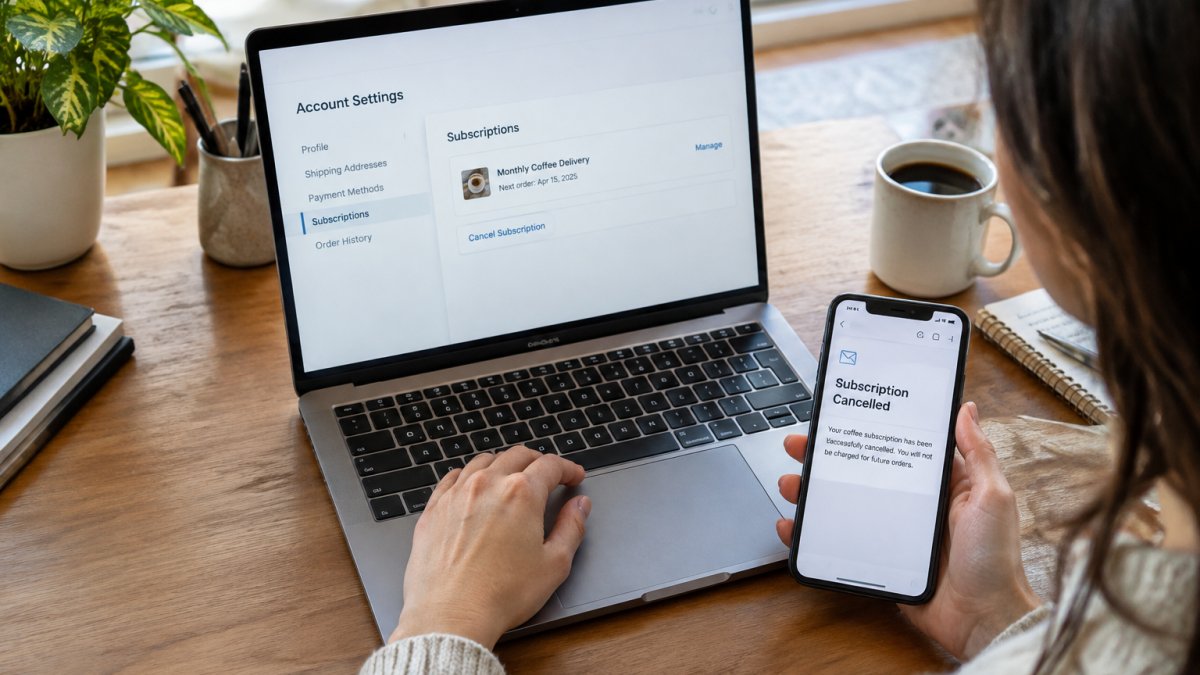
Here is the short version. Log in, open your subscription settings, choose cancel, then save the confirmation. That is it for most services.
The rest of this guide covers the tricky parts: stopping automatic payments before your next billing cycle, and what to do when the dashboard simply will not cooperate.
Logging In and Finding Subscription Settings
Start at the service's website and sign in with your account credentials.
Once you are in, look for one of these labels in the navigation menu:
- Account settings or My Account
- Subscriptions or Manage membership
- Recurring orders or Subscription profile
Click through to your subscription profile. This is where you will see your membership status, shipment frequency, delivery date, and payment method on file.
A common mistake is hunting for a "cancel" button on the homepage. It is almost never there. The option lives inside your account info, usually two or three clicks deep.
Confirming Cancellation and Saving Your Confirmation
When you click cancel, most platforms show a cancellation survey first. Answer it or skip it. Then confirm the cancellation.
Here is the part people skip: saving proof.
- Take a screenshot of the cancellation confirmation screen.
- Find the confirmation email in your inbox and keep it.
- Note the date and any reference number.
That record matters if a charge appears later. Without it, you are relying on the company's order history to prove your case.
How to Stop Automatic Subscription Payments Before the Next Billing Cycle
Timing decides whether you get charged one more time. Cancel before your next billing cycle starts and you usually avoid the upcoming charge.
So check your delivery date first. Your account dashboard shows the next scheduled shipment. If it is days away, cancel now.
Want a backup layer of protection? Here is how we would handle it:
- Cancel in the dashboard and save the confirmation.
- Check your payment method for any pre-authorized recurring payment setup.
- If your card issuer offers virtual cards, use one with a spending limit for subscriptions.
- Watch your statement for one full cycle after cancelling.
That last step catches the rare case where a cancellation did not fully process.
If recurring deliveries are the real issue and you want to keep the coffee, you can also automate coffee delivery on your own terms rather than cancelling outright.
Pausing or Skipping a Shipment Instead of Canceling
Cancelling is not your only option. Many services let you pause a subscription or skip a single shipment, which keeps your account active without a delivery.
Pausing helps when you have too much coffee on hand or you are travelling. Skipping helps when you want the next box but not this one.
Before you cancel, it is worth checking whether you can simply adjust your preferences instead. Our guide on how to customize coffee subscription preferences walks through changing roast, grind, and delivery timing.
Watch out: some platforms treat a pause as a limited benefit, so read the terms of service to see how long a pause can last before the subscription auto-renews.
Email and Phone Cancellation Requests When the Dashboard Fails
Sometimes the customer portal will not load, or the cancel button does nothing. In that case, you can request cancellation by email or phone.
Write a short, clear message:
Subject: Cancellation request for subscription #[number]
Hello, I would like to cancel my coffee subscription, account email [your email], effective immediately. Please confirm this cancellation in writing and confirm that no further charges will be made. Thank you.
Send it to the customer support address on the site. Keep the sent copy.
On the phone, ask for a confirmation email before you hang up. A verbal promise is not proof. If support says they cannot email, ask for a reference number and note the agent's name and the time of the call.
How to Cancel a Trade Coffee Subscription
Trade Coffee runs its cancellations through an online account, so you do not need to call. Sign in, open your account settings, and find the subscription management area.
From there:
- Select your active subscription.
- Choose the cancel option.
- Complete any survey step.
If you cannot find the option, contact their customer support by email and request written confirmation. Keep that reply until you have seen a full billing cycle pass with no charge.
The same rule applies here as anywhere: cancel before your next billing cycle, not after.
The Platform-Agnostic Shortcut Most Guides Miss
Here is how to identify which pattern you are dealing with:
- Recharge-style portals. Many Shopify-based coffee brands use Recharge. The portal typically opens from a "Manage subscriptions" link, shows your next shipment date, and offers skip, pause, and cancel in one place.
- Bold or Appstle-style portals. Similar layout: a subscription dashboard with a cancel link at the bottom of the subscription details page.
- Native store accounts. Some roasters build subscriptions into the main account page under "Subscriptions" or "Recurring orders."
If you are unsure, search your inbox for the last order confirmation. The footer often names the subscription platform or links directly to the portal. That link is usually faster than hunting through the storefront.
Watch out: a portal login is often separate from your store login. If your usual password does not work, use the portal's own password reset rather than creating a new store account, which can leave you with two profiles and no visible subscription.
How to Cancel an Atlas Coffee Club Subscription
Atlas Coffee Club also lets you manage your membership from your account. Log in through the customer portal, open your subscription profile, and look for the cancel or deactivate option.
A few practical notes:
- Check your next delivery date before cancelling.
- If you only want to slow things down, look for a frequency option first.
- Save the cancellation confirmation email.
If the dashboard gives you trouble, an email request works. Ask for written confirmation and hold onto it.
Refunds, Data Privacy, and What Happens After You Cancel
Cancelling stops future shipments. It does not automatically refund a charge already made. That distinction catches a lot of people, and it is the single most common source of post-cancellation support tickets.
Here is what usually happens after you cancel:
- Your membership status changes to cancelled or inactive, and the next shipment is removed from the queue.
- Your order history may stay visible for a while so you can download receipts.
- Your account info often remains unless you request account deletion.
Refunds for Mid-Cycle Cancellations
- Pre-shipment cancellation. If you cancel after a charge but before the order is picked or shipped, many services will refund the charge or void the authorization. Ask support to confirm the order has not shipped and request a refund in writing.
- Post-shipment cancellation. Once a box is in fulfillment or with the carrier, most services will not refund it. Some will accept a return of unopened bags, but coffee is often treated as a perishable and excluded from returns.
- Prorated or credit-only refunds. Some services issue account credit instead of a card refund. Credit is not the same as money back, so confirm the form of refund before you agree.
A common pattern is that the refund depends on the order status at the moment you cancel, not on how long you have been a member. Check the service agreement or ask support directly.
Watch out: a cancellation confirmation proves you cancelled, not that you are owed a refund. Ask for the refund decision in the same written thread so you have both on record.
Data Privacy After Cancellation
Cancelling a subscription and deleting your account are two different requests. On most platforms, cancellation leaves your profile, order history, and payment method on file so you can reactivate later. If you want your personal data removed, you usually have to ask.
Send a deletion request to customer support and keep the reply. Privacy laws in many regions give you a right to request deletion of personal data, though the exact rules depend on where you live and on the company's legal retention obligations.
Two practical steps:
- Ask support to confirm in writing which data will be deleted and which will be retained, and on what legal basis.
- Separately unsubscribe from marketing emails using the link in the footer of any message, since account deletion does not always stop promotional sends.
Mobile App vs. Desktop Browser Cancellation
The mobile app and the desktop browser do not always offer the same options. Some apps hide cancellation behind a link that opens in a browser anyway, and a few app builds omit the cancel control entirely.
If the app will not let you cancel, switch to a desktop browser and log in there. The full account settings page is usually easier to find on a larger screen.
Common Cancellation Mistakes and How to Avoid Them
Most failed cancellations come down to a handful of avoidable errors. Here is the checklist we would run through:
| Mistake | What Goes Wrong | Fix |
|---|---|---|
| Cancelling after the billing date | You get charged for one more box | Cancel before the next billing cycle |
| Skipping the confirmation email | No proof if a charge appears | Save the email and a screenshot |
| Assuming a pause is a cancellation | Subscription auto-renews later | Confirm the account status says cancelled |
| Only cancelling in the app | Option may not exist there | Use the desktop account dashboard |
| Forgetting to opt out of marketing | Emails keep arriving | Update email preferences separately |
| Not checking account credentials | You cannot log in to cancel | Use password reset before contacting support |
Two more worth flagging. First, a cancellation survey is not a cancellation. Finish the process and confirm. Second, if you share an account with someone else, make sure only one person manages the change so you do not cancel twice or miss it entirely.
Managing Your Fairwood Coffee Membership Before You Decide to Cancel
Before you cancel any coffee subscription, it is worth asking whether the problem is the service or the settings. Often it is the settings.
At Fairwood Coffee, we built our platform around fast, automated fulfillment. If you are weighing whether a subscription still makes sense, our breakdown of the benefits of subscription coffee services covers what you actually get for the commitment.
And if you are reconsidering the plan itself rather than leaving, you can order a premium coffee subscription online and pick the setup that fits your routine.
Frequently Asked Questions
Can I cancel a coffee subscription after an order has already been placed?
Yes, but timing matters. Contact customer support as soon as possible to ask whether an order can still be cancelled before it ships.
How do I stop automatic subscription payments if I cannot log in to my account?
If you cannot log in to your account, contact customer support for help. You can also contact your bank or card issuer about recurring charges from the merchant.
Can I pause a coffee subscription instead of canceling it?
Check your account settings to see whether pause or skip options are available for your subscription.
How do I cancel a Trade Coffee or Atlas Coffee Club subscription?
Both services let you cancel through your online account. Log in to the customer portal, open the subscription settings in the navigation menu, and select cancel. You will typically see a cancellation survey before the final confirmation. If the option is missing, email customer support and ask for written confirmation. Cancel at least a few days before your next billing cycle so the auto-renew charge does not process before the request is recorded.
Cancelling a coffee subscription takes five minutes when you know where to look, and the only real risk is timing it wrong. If you want a subscription you can actually manage on your own terms, Fairwood Coffee gives you artisan blends, premium branded gear, and fast automated fulfillment with account controls that stay in your hands. Get started with Fairwood Coffee and keep your coffee routine on your schedule, not the other way around.
